バックエンドAPI設計(Hono)
HonoでRESTエンドポイントを設計し、Zodバリデーション・JWTミドルウェア・エラーハンドリングを実装するパターンを理解する
バックエンドAPIは「フロントエンドからのリクエストを受け取り、DBを操作して結果を返す」仕組みである。このカリキュラムでは api/ ディレクトリで Hono v4 を使う。
この章で作るもの(全体像)
b12 まで in-memory だった Todo を、Hono の REST API に切り替える。React は fetch で API を叩き、受け取った JSON を画面に反映する。
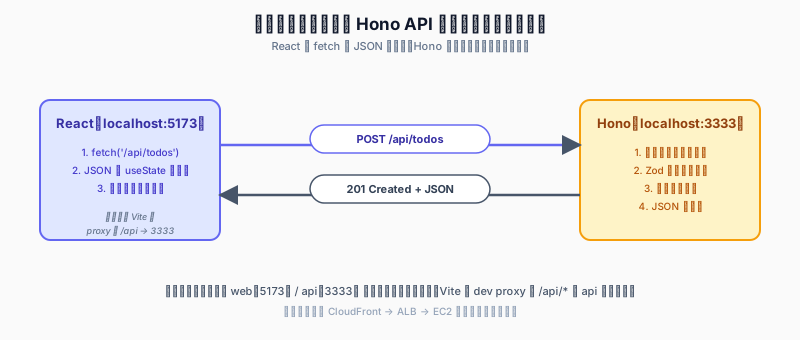
Honoの基本構造
// api/src/index.ts
import { Hono } from "hono";
import { serve } from "@hono/node-server";
import { postsRouter } from "./routes/posts";
import { authRouter } from "./routes/auth";

const app = new Hono();

// ヘルスチェック
app.get("/health", (c) => c.json({ status: "ok" }));

// ルーターを組み込む
app.route("/api/posts", postsRouter);
app.route("/api/auth", authRouter);

// エラーハンドリング
app.onError((err, c) => {
  console.error(err);
  return c.json({ error: "Internal Server Error" }, 500);
});

app.notFound((c) => c.json({ error: "Not Found" }, 404));

serve({ fetch: app.fetch, port: 3001 });
ルーター分割
エンドポイントをファイルごとに分割して管理する:
// api/src/routes/posts.ts
import { Hono } from "hono";
import { db } from "../db";
import { posts } from "../db/schema";
import { eq } from "drizzle-orm";

export const postsRouter = new Hono();

// GET /api/posts — 投稿一覧
postsRouter.get("/", async (c) => {
  const all = await db.select().from(posts).orderBy(posts.createdAt);
  return c.json(all);
});

// GET /api/posts/:id — 投稿詳細
postsRouter.get("/:id", async (c) => {
  const id = c.req.param("id");
  const post = await db.query.posts.findFirst({
    where: eq(posts.id, id),
  });
  if (!post) return c.json({ error: "Not found" }, 404);
  return c.json(post);
});

// POST /api/posts — 投稿作成
postsRouter.post("/", async (c) => {
  const body = await c.req.json();
  const [created] = await db.insert(posts).values(body).returning();
  return c.json(created, 201);
});
Zodバリデーション(@hono/zod-validator)
外部からの入力は必ず検証する:
import { zValidator } from "@hono/zod-validator";
import { z } from "zod";

const createPostSchema = z.object({
  content: z.string().min(1).max(140),
});

postsRouter.post(
  "/",
  zValidator("json", createPostSchema),
  async (c) => {
    const { content } = c.req.valid("json");
    const userId = c.get("userId");

    const [created] = await db
      .insert(posts)
      .values({ content, userId })
      .returning();

    return c.json(created, 201);
  }
);
zValidator を使うと、スキーマに違反するリクエストには自動で 400 Bad Request が返る。
JWTミドルウェア
認証が必要なエンドポイントを保護する:
// api/src/middleware/auth.ts
import { jwt } from "hono/jwt";

export const authMiddleware = jwt({
  secret: process.env.JWT_SECRET!,
});

// ログイン: JWTを発行する
// api/src/routes/auth.ts
import { sign } from "hono/jwt";

authRouter.post("/login", async (c) => {
  const { email, password } = await c.req.json();

  const user = await db.query.users.findFirst({
    where: eq(users.email, email),
  });

  if (!user || !(await verifyPassword(password, user.passwordHash))) {
    return c.json({ error: "Invalid credentials" }, 401);
  }

  const token = await sign(
    { sub: user.id, exp: Math.floor(Date.now() / 1000) + 60 * 60 * 24 },
    process.env.JWT_SECRET!
  );

  return c.json({ token });
});
認証が必要なルーターにミドルウェアを適用する:
postsRouter.post("/", authMiddleware, zValidator("json", createPostSchema), async (c) => {
  const payload = c.get("jwtPayload");
  const userId = payload.sub;
  // ...
});
エラーハンドリング
400 Bad Request      — バリデーションエラー・不正なリクエスト
401 Unauthorized     — 認証が必要(JWTがない・期限切れ)
403 Forbidden        — 認証済みだが権限不足
404 Not Found        — リソースが存在しない
409 Conflict         — 重複(例:既存のメールアドレス)
500 Internal Server  — サーバー側のバグ
DifyをHonoから呼び出す
// api/src/routes/summarize.ts
export const summarizeRouter = new Hono();

summarizeRouter.post("/", authMiddleware, async (c) => {
  const { reportText } = await c.req.json();

  const difyRes = await fetch("https://api.dify.ai/v1/completion-messages", {
    method: "POST",
    headers: {
      Authorization: `Bearer ${process.env.DIFY_API_KEY}`,
      "Content-Type": "application/json",
    },
    body: JSON.stringify({
      inputs: { report: reportText },
      response_mode: "blocking",
      user: "webapp-user",
    }),
  });

  const data = await difyRes.json();
  return c.json({ summary: data.answer });
});
フロントエンドは /api/summarize だけを知っていればよく、DifyのAPIキーをブラウザに公開せずに済む。
手を動かす
b12 で作った in-memory の Todo 一覧を、Hono の REST API に切り替える。ブラウザをリロードしてもサーバー側のメモリにあるデータは消えないため、永続化への橋渡しとなる。
やること
- リポジトリルートに
api/を追加し、Hono のひな型を作る GET /api/todos/POST /api/todos/PATCH /api/todos/:idを実装web/の Vite に/api/*を 3333 へ転送する proxy を設定- React 側を
fetchに差し替え
プロジェクト構成(クリックで開く)
repo/
├── web/              (b11-b12 で作成済み)
├── api/
│   ├── src/
│   │   └── index.ts
│   ├── package.json
│   └── tsconfig.json
└── pnpm-workspace.yaml   # web と api を同時に管理
api のセットアップコマンド(クリックで開く)
mkdir api && cd api
pnpm init
pnpm add hono @hono/node-server
pnpm add -D typescript tsx @types/node
api/src/index.ts(クリックで開く)
import { Hono } from 'hono';
import { cors } from 'hono/cors';
import { serve } from '@hono/node-server';

type Todo = { id: number; text: string; done: boolean };

const app = new Hono();
app.use('/api/*', cors());

// in-memory ストア(b15 で DB に置き換える)
const todos: Todo[] = [];

app.get('/api/todos', (c) => c.json(todos));

app.post('/api/todos', async (c) => {
  const { text } = await c.req.json<{ text: string }>();
  if (!text?.trim()) return c.json({ error: 'text is required' }, 400);
  const todo = { id: Date.now(), text, done: false };
  todos.push(todo);
  return c.json(todo, 201);
});

app.patch('/api/todos/:id', async (c) => {
  const id = Number(c.req.param('id'));
  const todo = todos.find((t) => t.id === id);
  if (!todo) return c.json({ error: 'not found' }, 404);
  todo.done = !todo.done;
  return c.json(todo);
});

serve({ fetch: app.fetch, port: 3333 }, (info) => {
  console.log(`api listening on http://localhost:${info.port}`);
});
web/vite.config.ts(proxy 設定・クリックで開く)
import { defineConfig } from 'vite';
import react from '@vitejs/plugin-react';

export default defineConfig({
  plugins: [react()],
  server: {
    proxy: {
      '/api': 'http://localhost:3333',
    },
  },
});
web/src/App.tsx(fetch に差し替え・クリックで開く)
import { useEffect, useState } from 'react';
import { TodoItem } from './components/TodoItem';

type Todo = { id: number; text: string; done: boolean };

export default function App() {
  const [todos, setTodos] = useState<Todo[]>([]);
  const [input, setInput] = useState('');

  useEffect(() => {
    fetch('/api/todos').then((r) => r.json()).then(setTodos);
  }, []);

  const addTodo = async () => {
    if (!input.trim()) return;
    const res = await fetch('/api/todos', {
      method: 'POST',
      headers: { 'Content-Type': 'application/json' },
      body: JSON.stringify({ text: input }),
    });
    if (res.ok) {
      const newTodo = await res.json();
      setTodos([...todos, newTodo]);
      setInput('');
    }
  };

  const toggle = async (id: number) => {
    const res = await fetch(`/api/todos/${id}`, { method: 'PATCH' });
    if (res.ok) {
      const updated = await res.json();
      setTodos(todos.map((t) => (t.id === id ? updated : t)));
    }
  };

  return (
    <main>
      <h1>Todo</h1>
      <input value={input} onChange={(e) => setInput(e.target.value)} />
      <button onClick={addTodo}>追加</button>
      <ul>
        {todos.map((t) => (
          <TodoItem key={t.id} text={t.text} done={t.done} onToggle={() => toggle(t.id)} />
        ))}
      </ul>
    </main>
  );
}
実行
# ターミナル 1:API
cd api && pnpm tsx src/index.ts

# ターミナル 2:web
cd web && pnpm dev
成功条件
-
curl http://localhost:3333/api/todosで[]が返っていること - ブラウザから Todo を追加した後、同じ curl で追加した Todo が配列に入って返っていること
- ブラウザをリロードしても、API が動いている限り画面に Todo が表示され続けていること
-
curl -X POST -H 'Content-Type: application/json' -d '{"text":"test"}' http://localhost:3333/api/todosが 201 と JSON を返していること -
apiプロセスを再起動すると、API が返す配列が[]に戻っていること(まだ DB に入っていない証拠)
次の章(b14)で 詳細ページへのルーティング を加え、b15 で Postgres + Drizzle に切り替えて永続化する。
参考リソース
- Hono公式(https://hono.dev/)
- @hono/zod-validator(https://hono.dev/docs/guides/validation)
- Zod(https://zod.dev/)— TypeScript向けバリデーションライブラリ
- 『APIデザイン・パターン』JJ Geewax著(マイナビ出版)
確認クイズ
Q1. Honoでルーターをファイル分割して管理するとき、メインファイルでルーターを組み込むメソッドはどれか。 A. app.use() B. app.route() C. app.mount() D. app.register()
正解: B. app.route()
解説: app.route("/api/posts", postsRouter) のように、パスとルーターオブジェクトを渡して組み込む。app.use() はミドルウェアの登録に使い、mount や register はHonoのAPIに存在しない。
Q2. @hono/zod-validator でリクエストボディを検証するとき、バリデーション通過後の値を取り出すコードはどれか。 A. c.req.body() B. c.req.json() C. c.req.valid("json") D. c.get("body")
正解: C. c.req.valid("json")
解説: zValidator を通過したデータは c.req.valid("json") で型安全に取り出せる。c.req.json() は生のリクエストボディをパースするが、バリデーション結果ではない。
Q3. Zodスキーマで z.string().min(1).max(140) と定義したとき、空文字列 "" を渡すとHonoはどのHTTPステータスを返すか。
正解: 400 Bad Request
解説: zValidator はスキーマ違反のリクエストに自動で 400 Bad Request を返す。min(1) の制約により空文字列は検証に失敗するため、ハンドラーには到達しない。
Q4. JWTミドルウェアを適用したエンドポイントで、デコードされたペイロードを取り出す方法はどれか。 A. c.get("jwt") B. c.get("jwtPayload") C. c.req.header("authorization") D. c.get("user")
正解: B. c.get("jwtPayload")
解説: Honoの jwt() ミドルウェアはデコードしたペイロードをコンテキストの jwtPayload キーにセットする。c.get("jwtPayload") で取り出し、payload.sub などでクレームにアクセスできる。
Q5. JWTを発行するとき、有効期限(exp)として「現在から24時間後」を表す正しい値はどれか。 A. Date.now() + 86400 B. Math.floor(Date.now() / 1000) + 60 * 60 * 24 C. new Date().getTime() + 24 D. Date.now() + 60 * 60 * 24
正解: B. Math.floor(Date.now() / 1000) + 60 * 60 * 24
解説: JWTの exp クレームはUnixタイム(秒単位)で表す。Date.now() はミリ秒なので / 1000 で秒に変換し、さらに24時間分の秒数(86400秒)を加算する。
Q6. 認証済みユーザーがアクセスしたが操作権限がない場合、返すべき適切なHTTPステータスコードはどれか。 A. 401 B. 403 C. 404 D. 409
正解: B. 403 Forbidden
解説: 401 は「認証されていない(誰か不明)」、403 は「認証済みだが権限不足」を意味する。ログイン済みのユーザーが他人のリソースを操作しようとした場合は 403 が適切。
Q7. 同一メールアドレスのユーザーが既に存在する場合、返すべきHTTPステータスコードはどれか。 A. 400 B. 404 C. 409 D. 422
正解: C. 409 Conflict
解説: 409 Conflict はリソースの重複やデータの競合が発生したことを示す。メールアドレスの重複登録はこの典型例。バリデーションエラー(形式不正)とは区別して使う。
Q8. DifyのAPIをHonoから呼び出す設計で、DifyのAPIキーをブラウザに公開しない理由はどれか。
正解: HonoのエンドポイントがDifyへのリクエストを中継し、APIキーはサーバー側の環境変数にのみ保持されるから
解説: ブラウザから直接DifyのAPIを呼ぶとAPIキーがJSバンドルやリクエストに含まれ漏洩リスクが生じる。バックエンドを中継役にすることでAPIキーをサーバー内部に閉じ込められる。
Q9. Honoでグローバルなエラーハンドリングを設定するメソッドはどれか。 A. app.catch() B. app.use("*", ...) C. app.onError() D. app.error()
正解: C. app.onError()
解説: app.onError((err, c) => { ... }) でアプリ全体の未捕捉エラーを一元処理できる。404ハンドラーには app.notFound() を使う。これにより各ルートで try/catch を繰り返さなくて済む。
Q10. serve({ fetch: app.fetch, port: 3001 }) の fetch プロパティにHonoのアプリを渡す理由は何か。
正解: HonoはWeb標準の fetch APIに基づいたインターフェースを持つため、@hono/node-server がそのまま受け取ってNode.jsのHTTPサーバーとして動かせるから
解説: HonoはEdge Runtime・Node.js・Cloudflare Workersなど複数の環境で動作するよう設計されており、コアはWeb標準の Request/Response を使う。serve() はその標準インターフェースをNode.jsのネットワーク層に橋渡しする役割を担う。
発展:より実務的なパターン
ここから先は Week 13 / Week 14 で使う、より実務に近いパターンです。
条件付きバリデーション(discriminated union / refine)
「通知方法が email なら email フィールド必須、push なら device_token 必須」のような条件分岐:
const notifyByEmailSchema = z.object({
  method: z.literal("email"),
  email: z.string().email(),
});

const notifyByPushSchema = z.object({
  method: z.literal("push"),
  deviceToken: z.string().min(32),
});

export const notifySchema = z.discriminatedUnion("method", [
  notifyByEmailSchema,
  notifyByPushSchema,
]);
discriminatedUnion を使うと、TypeScript が method に応じてフィールドを narrow してくれます。
cross-field 検証は .refine で:
export const dateRangeSchema = z
  .object({
    startDate: z.string().datetime(),
    endDate: z.string().datetime(),
  })
  .refine((data) => new Date(data.startDate) < new Date(data.endDate), {
    message: "開始日は終了日より前である必要があります",
    path: ["endDate"],
  });
認可ミドルウェア(ロールベース)
認証(誰か)と認可(何ができるか)を分離します。認証は authMiddleware、認可は追加の middleware で:
import { createMiddleware } from "hono/factory";
import { ForbiddenError } from "../lib/errors";

export function requireRole(...allowed: string[]) {
  return createMiddleware(async (c, next) => {
    const role = c.get("role") as string | undefined;
    if (!role || !allowed.includes(role)) {
      throw new ForbiddenError(`この操作には ${allowed.join(" / ")} ロールが必要です`);
    }
    await next();
  });
}
使い方:
// 管理者のみ全投稿を削除できる
postsRouter.delete(
  "/:id/admin",
  authMiddleware,
  requireRole("admin"),
  async (c) => { /* ... */ },
);
リソース所有者チェック(middleware 化)
「自分の投稿だけ削除できる」パターンを middleware 化:
export function requirePostOwner() {
  return createMiddleware(async (c, next) => {
    const id = c.req.param("id");
    const userId = c.get("userId") as string;
    const [post] = await db.select().from(posts).where(eq(posts.id, id));
    if (!post) throw new NotFoundError("Post", id);
    if (post.authorId !== userId) throw new ForbiddenError();
    c.set("post", post);  // ハンドラで使い回す
    await next();
  });
}

postsRouter.delete("/:id", authMiddleware, requirePostOwner(), async (c) => {
  const post = c.get("post");
  await db.delete(posts).where(eq(posts.id, post.id));
  return c.body(null, 204);
});
ハンドラが「ビジネスロジックだけ」に集中できます。
ページネーション(cursor-based)
offset + limit はレコードが増えると遅くなります。本カリキュラムは cursor-based を推奨:
const listPostsSchema = z.object({
  cursor: z.string().datetime().optional(),  // 前ページ最後の createdAt
  limit: z.coerce.number().int().min(1).max(50).default(20),
});

postsRouter.get("/", zValidator("query", listPostsSchema), async (c) => {
  const { cursor, limit } = c.req.valid("query");
  const rows = await db
    .select()
    .from(posts)
    .where(cursor ? lt(posts.createdAt, new Date(cursor)) : undefined)
    .orderBy(desc(posts.createdAt))
    .limit(limit + 1);

  const hasNext = rows.length > limit;
  const items = rows.slice(0, limit);
  return c.json({
    items,
    nextCursor: hasNext ? items[items.length - 1].createdAt.toISOString() : null,
  });
});
フロントは nextCursor を次リクエストの ?cursor= に渡すだけ。無限スクロール 実装が楽になります。
エラーレスポンスの標準化
詳細は b14-error-handling で扱います。ここでは簡潔に全レスポンス形式:
// 成功
{ "id": "...", "content": "..." }

// 単体エラー
{
  "error": "NOT_FOUND",
  "message": "Post が見つかりません: abc123",
  "details": null
}

// Zod バリデーション失敗
{
  "error": "VALIDATION_FAILED",
  "message": "入力値が不正です",
  "details": {
    "fieldErrors": { "content": ["本文は 280 文字以内で入力してください"] }
  }
}
レート制限(rate limiting)
本番 API で DDoS や brute-force を防ぐ最小ライン:
import { rateLimiter } from "hono-rate-limiter";

const loginLimiter = rateLimiter({
  windowMs: 60 * 1000,       // 1 分
  limit: 5,                   // 5 リクエストまで
  keyGenerator: (c) => c.req.header("x-forwarded-for") ?? "anonymous",
});

authRouter.post("/login", loginLimiter, /* ... */);
IP ベースは ALB / CloudFront の場合 x-forwarded-for に要注意(信頼できる層からの値だけを見る)。
CORS の最小設定
import { cors } from "hono/cors";

app.use(
  "/api/*",
  cors({
    origin: process.env.CORS_ORIGIN ?? "http://localhost:3000",
    credentials: true,
    allowHeaders: ["Content-Type", "Authorization"],
  }),
);
開発環境は Vite proxy で CORS を迂回できますが(b00-env-setup)、本番では CloudFront から 1 つの origin に束ねるか、ここで ALLOW_ORIGIN を厳密に指定します。
参考リソース
- Hono公式(https://hono.dev/)
- @hono/zod-validator(https://hono.dev/docs/guides/validation)
- Zod(https://zod.dev/)— TypeScript向けバリデーションライブラリ
- hono-rate-limiter: https://github.com/rhinobase/hono-rate-limiter
- 『APIデザイン・パターン』JJ Geewax著(マイナビ出版)
- 関連教材: b07-auth-patterns(認証の具体実装)/ b14-error-handling(エラー設計 3 層)/ b12b-form-validation(フロント側の Zod 共有)
生きているコード
本ドキュメントで扱ったパターンの完全な動作コードは、メンター側リポジトリの参照ブランチで確認できます。
- 対応 Week: W3 / W13
- 参照ブランチ:
- W3:
reference/week-3 - W13:
reference/week-13 - 対応 checklist 項目: M1-M8
ブランチの作り方・見方は b00-curriculum-map を参照してください。
- 1. 📄Web とは何か
- 2. 📄URL を打ってから画面が表示されるまで
- 3. 📄ネットワーク基礎(TCP/IP・DNS・HTTPS)
- 4. 📄【発展】物理層から通信が成立するまで(電力・Ethernet・Wi-Fi・Bluetooth)
- 5. 📄WSL2・Docker セットアップ詳細(Windows 向け)
- 6. 📄環境構築の段階的導入(macOS / Windows)
- 7. 📄カリキュラム全体マップ(Week × 教材 × 参照ブランチ × 要求チェックリスト)
- 8. 📄このカリキュラムの使い方(SQL・Python・Dify経験者向け)
- 9. 📄シェル・ターミナル基礎
- 10. 📄Windows で完全にゼロから始める開発環境構築(Week 1)
- 11. 📄Git基礎
- 12. 📄GitHubワークフロー
- 13. 📄パッケージ管理(pnpm workspace)
- 1. 📄Reactコンポーネント設計の基礎
- 2. 📄状態管理の概念
- 3. 📄バックエンドAPI設計(Hono)
- 4. 📄ルーティング(React Router v7)
- 5. 📄Hono のエラーハンドリング(Month 4 Week 13)
- 6. 📄データベース設計・SQL→Drizzle ORM対応
- 7. 📄マイグレーションの考え方
- 1. 📄AWSインフラ基礎
- 2. 📄AWS Budget Alert の設定(Month 5 Week 17)
- 3. 📄環境変数管理
- 4. 📄Bastion EC2 と SSH ProxyJump(Month 5 Week 18)
- 5. 📄CI/CD基礎
- 6. 📄ECR への Docker イメージ push と App EC2 デプロイ(Month 5 Week 19)
- 7. 📄テスト設計の基本
- 8. 📄CloudFront + S3 + ALB で公開する(Month 5 Week 20)
- 9. 📄CLAUDE.md・プロジェクト設定
- 10. 📄PR レビュー 5 観点ルーブリック(全 Week 共通)
- 11. 📄タスク分解・仕様の書き方
- 12. 📄Playwright で E2E テスト(Month 6 Week 22)
- 13. 📄生成コードのレビュー・デバッグの勘所
- 14. 📄Trivy で脆弱性スキャン(Month 6 Week 23)
- 15. 📄CloudWatch Logs の読み方と運用(Month 6 Week 23)
- 16. 📄PDF ポートフォリオの自動生成(Month 6 Week 24)